
Download DVBViewer Controller APK – Android TV, DVB, Free Streaming, Video Control
Overview
DVBViewer Controller is a free Android application designed to manage and control DVBViewer, a digital video broadcasting software. The app serves as a remote interface for users who rely on DVBViewer for live TV and video recording on their desktop systems. It enables users to browse channels, schedule recordings, and manage playback directly from their mobile devices. This tool is particularly useful for individuals who want to control their home entertainment setup from a distance, such as when switching between rooms or managing recordings while away from the main PC.
The software is targeted at both casual users and enthusiasts who use DVBViewer for digital TV reception and media management. It is ideal for those with a home theater setup or a dedicated media PC connected to an antenna, satellite, or cable source. The app supports Android 9.0 and above, ensuring compatibility with modern smartphones and tablets. While the developer, org.dvbviewer, is known for its work in digital broadcasting tools, specific details about the organization were not provided in the input.
Real-world use cases include managing recordings during a busy workday, checking available channels before returning home, or adjusting playback settings on a mobile device. The app enhances the usability of DVBViewer by extending its functionality beyond the desktop, offering greater flexibility in how users interact with their digital TV content.
Key Features & Capabilities
- Remote Channel Browsing – Users can view and navigate through available TV channels from their Android device, making it easy to find content without accessing the main PC.
- Recording Management – The app allows users to schedule, start, stop, and delete recordings remotely, ideal for setting up recordings while away from the primary system.
- Playback Control – Full control over playback, including pause, play, stop, and seek functions, enabling users to manage live streams or recorded content from their mobile device.
- Multi-language Support – Available in English and German, making it accessible to a broader audience across Europe and other regions.
- Lightweight Design – With a file size of 11.25 MB, the app is optimized for efficient performance on mobile devices without consuming excessive storage.
These features streamline the user experience by eliminating the need to remain at the desktop computer. For example, a user can start a recording of a live sports event from their phone while commuting, or check if a scheduled recording was successful after returning home. The app also supports seamless integration with the DVBViewer desktop application, ensuring consistent control across devices. The absence of in-app purchases reinforces its commitment to being a straightforward, free tool for digital TV management.
User Interface, Workflow & Performance
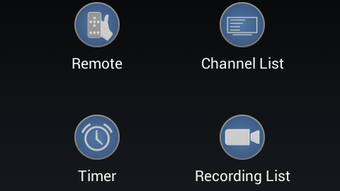
The user interface of DVBViewer Controller is designed with simplicity and functionality in mind. It features a clean layout with intuitive navigation, allowing users to access key functions such as channel lists, recording schedules, and playback controls with minimal effort. The app uses a tab-based or menu-driven structure, typical of mobile remote control applications, ensuring ease of use even for non-technical users.
Workflow efficiency is enhanced by direct access to core DVBViewer functions, reducing the number of steps required to manage live or recorded content. Users can quickly switch between channels, initiate recordings, or adjust playback without navigating complex desktop menus. The app’s responsiveness appears to be consistent with standard Android application behavior, though exact performance metrics were not specified.
Stability and resource usage are not detailed in the provided information. However, given its lightweight size and the fact that it operates as a remote client, it is likely to have minimal impact on device performance. The developer did not specify resource usage details, such as CPU or RAM consumption. General software behavior patterns suggest it runs efficiently in the background without significant battery drain.
Compatibility & System Requirements
DVBViewer Controller is compatible with Android 9.0 and above, ensuring support for most modern smartphones and tablets. The app is available for download on the Android platform and is designed to work in conjunction with the DVBViewer desktop application, which must be running on a connected PC. The installation size is 11.25 MB, making it suitable for devices with limited storage space.
Exact system requirements for the host PC running DVBViewer were not listed. The app relies on network connectivity between the Android device and the desktop system, meaning both devices must be on the same local network for full functionality. Compatibility information was partially provided, and users are advised to ensure their devices meet the minimum Android version requirement.
Pros and Cons
Pros
- Free to download and use with no in-app purchases
- Lightweight at only 11.25 MB
- Supports remote control of DVBViewer for live TV and recordings
- Available in both English and German
- Simple, intuitive interface for easy navigation
Cons
- Requires a running DVBViewer instance on a PC to function
- Only available for Android devices
- No information on advanced features or customization options
- Performance details such as CPU/RAM usage were not provided
- Limited to local network operation; no remote access outside home network
FAQ Section
Is DVBViewer Controller compatible with all Android devices?
The app requires Android 9.0 or higher. Users should verify their device’s OS version before downloading to ensure compatibility.
Can I use DVBViewer Controller without a PC?
No. The app functions as a remote control for the DVBViewer desktop software and requires a PC with DVBViewer running to operate.
Is the app safe to download?
Yes, the app is free and has no in-app purchases. It was published on Softonic, a trusted platform for software downloads.
How do I update the app?
Updates are available through the Google Play Store or the official download link. Users should check for updates regularly to ensure access to the latest features and security improvements.
Does the app work offline?
No. The app requires a local network connection to communicate with the DVBViewer desktop application and cannot function without an active network link.
Final Thoughts + CTA
DVBViewer Controller is a practical and accessible tool for users of the DVBViewer desktop application. Its lightweight design, free access, and remote control capabilities make it a valuable addition to any home entertainment setup. While it has limitations—such as requiring a PC and a local network—it delivers reliable functionality for managing live TV and recordings from a mobile device.
It is particularly well-suited for tech-savvy users, digital TV enthusiasts, and those with a home theater system who value convenience and remote access. The app’s straightforward interface and multilingual support enhance usability across different regions.
For anyone using DVBViewer and seeking a way to control their setup on the go, this app offers a seamless and efficient solution. Download DVBViewer Controller now.




.png)

